


QuoteIQ: Field Service CRM
4.4702.00 Reviews
App Specs
- Version
- 2026.08.20
- Updated On
- License
- Free
- Downloads
- 10,000+
- Developer
- QuoteIQ
- Categories
- Business
- Platform
- Android
Screenshots


 Analysis by AppCompare
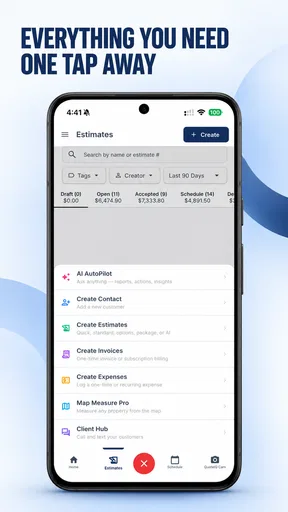
I should start with an important distinction: QuoteIQ is a business app, not a quote-of-the-day reader. I wouldn’t install it expecting inspirational sayings, themed quote feeds, or a place to collect and share favorite lines. Its purpose is to help people who provide services manage work, so the useful question is whether it fits the way you handle customer jobs, estimates, and day-to-day business tasks.
Where it fits into a working day
I’d look at QuoteIQ as a potential home base for a service professional who is tired of keeping customer details and job information scattered across messages, notes, and separate tools. The appeal of a business management app is not that it makes field work disappear; it is that it can make the steps around the work easier to keep track of. That matters when a day includes answering an inquiry, preparing a quote, travelling to a job, and remembering who needs a follow-up.
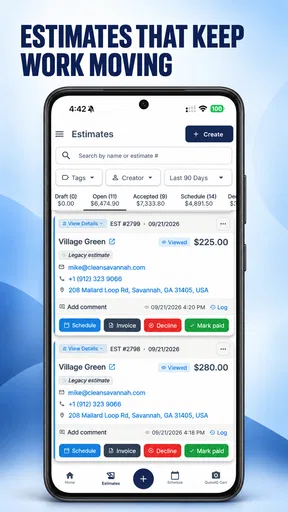
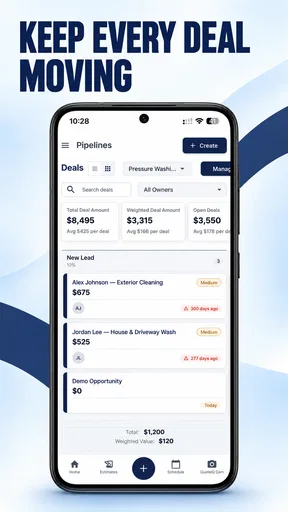
Picture a small cleaning or repair business owner finishing one appointment while a new customer is asking for an estimate. The practical goal is to keep the inquiry from getting lost while moving on to the next job. A dedicated business tool may make that kind of routine more orderly than relying on a personal notes app, but I would still check that its actual workflow matches the way the business prices and schedules work before making it the centre of operations.
One business, one clear account boundary
The household angle needs a little care here. This isn’t a family organizer or a shared home app; it is meant for professional service work. If a phone or tablet is shared, I’d treat the business account as belonging to the person or company responsible for customer relationships, rather than letting every household member use it casually. Customer and job information is work material, and keeping that boundary clear helps avoid confusion about who is responding or making decisions.
For a family-run service business, sharing responsibility can be useful, but shared responsibility works best when each person knows their role. Before handing a device to a partner or relative, agree on who handles new inquiries, who updates job details, and who follows up with customers. I would not assume that a household account automatically provides separate roles or private spaces; choose a setup only after confirming that it suits the people who will actually use it.
Coordination without turning the phone into the plan
A dedicated business app can give a team a more consistent place to work than a mix of text threads and handwritten reminders. Even so, an app cannot replace a simple agreement about the handoff: what counts as a confirmed job, who is responsible for the next customer contact, and when a quote needs attention. Those small rules are especially valuable when one person is out in the field and another is answering calls or messages.
My practical tip is to decide on a short, repeatable routine before relying on any new system: capture each inquiry, record the next action, and review unfinished items at a predictable point in the day. That approach can reveal whether QuoteIQ genuinely helps your business stay on top of work, instead of merely moving the same confusion from paper into an app. For a solo operator, the routine can be as simple as checking open work before wrapping up; for a small team, it can give everyone a shared sense of what still needs attention.
Worth Reading Before You Choose

Baby Panda World Brings Quick Play to Modern Phones, but Its Game Library Feels Busy

ESPN’s Live Game View Makes Following Close Games Easier

QuizzLand Review: A Good Fit for Short Trivia Breaks, Not Every Player

Basketball Stars: Multiplayer Is Fast, but Can It Recover When Matches Go Wrong?

WEBTOON Turns Phone Updates Into a Better Reading Routine

Link to Windows Runs on Shared Habits, Not Social Feeds
Is QuoteIQ a good fit for a service business?
As a business app, QuoteIQ is developed by QuoteIQ and is aimed at professionals in service industries. It is free to install, with in-app purchases ranging from $6.99 to $799.99 per item, so I’d check the current plan details against the features the business actually needs before committing to paid options. It has a 4.5 average from around 1.1 thousand ratings, with over 10 thousand installs. The app is rated Everyone, was released on September 16, 2022, and its current version is 2026.03.02, for devices running Android 8.0 or later.
What to check before moving your workflow
The first question I’d ask is whether the app’s approach to quoting fits the work you sell. A contractor who prices each job after an on-site assessment may need a different process from a service provider who uses a repeatable set of services. Before moving customer records or changing how the team works, try a representative job from inquiry through quote and follow-up. Notice where you have to stop and improvise; those pauses are a better test of fit than a polished first impression.
I’d also separate “free to download” from “free for every useful business workflow.” The purchase range is broad enough that cost deserves a deliberate look, especially for a new solo business watching expenses. Identify the one or two capabilities that would save the most time, then compare the relevant paid option with the cost of your current setup. If you only need occasional estimates, a simpler tool may be plenty. If job administration is eating into time you could spend serving customers, a more complete system may be worth evaluating.
Compared with spreadsheets, messages, and specialist tools
Many small operators start with a spreadsheet, a calendar, and text messages. That combination is inexpensive and flexible, but it depends on careful manual updates, and details can end up in several places. A service-focused business app is appealing when you want a more purpose-built way to keep work organized. The trade-off is that a dedicated system asks you to learn its structure and may be less adaptable than a spreadsheet for unusual pricing, reporting, or internal processes.
At the other end, some businesses use separate specialist tools for estimates, scheduling, customer records, and payment administration. Those can be a better fit when a business has a mature workflow or very specific requirements, but switching between them can create its own overhead. I’d compare QuoteIQ with your current tools by tracing one ordinary customer job through every step, not by comparing feature names. If the app reduces repeated entry and makes the next action clearer, that is meaningful. If you still need several workarounds, keeping a simpler setup or choosing a specialist alternative may be wiser.
Age, trust, and a sensible household verdict
The Everyone content rating is an age classification, not a signal that the app is designed for children or that it offers household supervision features. I’d keep its use focused on the adult or business team responsible for service work. If a younger family member borrows the device, the more useful boundary is simply not to leave business screens and customer information open for casual use. That is a common-sense device habit, not a claim about any particular privacy setting.
For a household that runs a service business together, QuoteIQ may be worth exploring if coordinating customer work has become harder than doing the work itself. For a household looking for shared shopping lists, chores, family calendars, or a quote-reading app, it is the wrong category altogether. I’d start with the person who owns the workflow, test a typical job, and involve other workers only once everyone understands how responsibilities will be divided.
My verdict for the right kind of user
I wouldn’t recommend QuoteIQ just because a business owner wants another app on their phone. I would consider it when quotes and service-business administration are a recurring part of the job and the current mix of notes, messages, and spreadsheets is becoming hard to manage. The best fit is likely someone willing to make a consistent process and check that the app’s paid options make sense for their needs. If the work is occasional, the existing tools are already clear, or the business relies on specialized workflows the app does not accommodate, there is no reason to switch just for the sake of using a dedicated platform.
Before adopting it, I’d answer three practical questions through a small trial: Can I handle a normal customer job in the order I actually work? Can everyone who needs to participate understand who owns each next step? And does the cost of the relevant option justify replacing what I use now? If those answers are encouraging, QuoteIQ has a credible place on the shortlist for service professionals. If not, a calendar, spreadsheet, or more specialized business tool may be the more comfortable choice.
First Impressions Matter
When you first open QuoteIQ, you’re greeted with a sleek and minimalist interface. It’s like the app knows that simplicity is key when you’re just trying to get a quick dose of wisdom. No clutter, just pure, unadulterated quotes. The main screen features a daily quote, and trust me, it feels like a little gift every time you open it.
Features That Shine
One of the standout features for me is the ability to personalize your quote feed. You can choose from various categories like motivation, love, success, and more. It’s like having a personal cheerleader in your pocket. Plus, the app learns from your preferences, so the more you use it, the better the recommendations get. Pretty neat, right?
Another fantastic feature is the option to save your favorite quotes. Whether you want to revisit them during a tough day or share them with friends, QuoteIQ makes it super easy. Just tap on the quote you like, and it’s saved in your favorites. You can even create collections, which is perfect for organizing them by theme or mood.
User Experience
Now, let’s talk about user experience. Navigating through the app is a breeze, thanks to its intuitive design. The developers clearly put a lot of thought into making QuoteIQ user-friendly. Even if you’re not tech-savvy, you’ll find everything you need without any hassle.
The app also supports dark mode, which is a blessing for late-night browsing. It’s easy on the eyes and makes the reading experience feel more immersive. Plus, who doesn’t love a good dark mode?
Quotable Moments
While the app is brimming with quotes from famous figures, it also includes lesser-known gems that might just become your new favorites. It’s like discovering a band before they hit the big time. Plus, there’s a nifty feature where you can submit your own quotes. If you’re feeling creative, this is your chance to contribute to the community.
Staying Social
In today’s connected world, sharing is caring, and QuoteIQ makes it super easy to spread the love. Whether you want to post a motivational quote on social media or send a heartfelt message to a friend, the app lets you share directly. It’s a great way to brighten someone’s day with just a few taps.
Final Thoughts
After spending some time with QuoteIQ, I can honestly say it’s a must-have for anyone who loves a good quote. It’s not just about reading words on a screen; it’s about finding inspiration and sharing positivity. The app’s design is clean, its features are robust, and the content is top-notch.
So, if you’re looking for a little daily inspiration or just want to explore a world of wisdom, give QuoteIQ a try. It might just become your new favorite app. And let’s be real, who doesn’t need a little extra motivation now and then?
Pros
- User-friendly interface for easy navigation.
- Wide variety of quotes across categories.
- Daily notifications for new inspiration.
- Option to save and share favorite quotes.
- Offline access to saved quotes.
Cons
- Limited customization for notifications.
- Ads can be intrusive at times.
- No option for custom quote creation.
- Requires internet for full category access.
- Initial setup can be slightly confusing.
FAQs for QuoteIQ: Field Service CRM
What is QuoteIQ and how does it work?
QuoteIQ is a productivity app designed to help users manage and organize their favorite quotes. It offers features like categorization, tagging, and sharing options. Users can easily search and filter quotes, making it a handy tool for students, writers, and anyone who loves to collect inspirational words.
Is QuoteIQ available on both Android and iOS devices?
Yes, QuoteIQ is available for download on both Android and iOS platforms. Users can find the app on Google Play Store for Android devices and the App Store for iOS devices. Ensure your device meets the necessary requirements for a smooth installation process.
Does QuoteIQ offer any customization options?
QuoteIQ allows users to customize their experience with various themes and font styles. You can personalize the app's appearance to suit your preferences, making it more enjoyable to use. Additionally, you can create custom categories and tags to organize your quotes efficiently.
Is there a premium version of QuoteIQ available?
Yes, QuoteIQ offers a premium version that unlocks additional features such as ad-free browsing, cloud backup, and exclusive themes. The premium version helps enhance user experience by providing more robust functionalities and an uninterrupted interface.
How secure is my data on QuoteIQ?
QuoteIQ prioritizes user data security with encryption and privacy measures. The app ensures that your saved quotes and personal information are protected. For added security, users can enable password protection or biometric authentication, depending on their device capabilities.


